
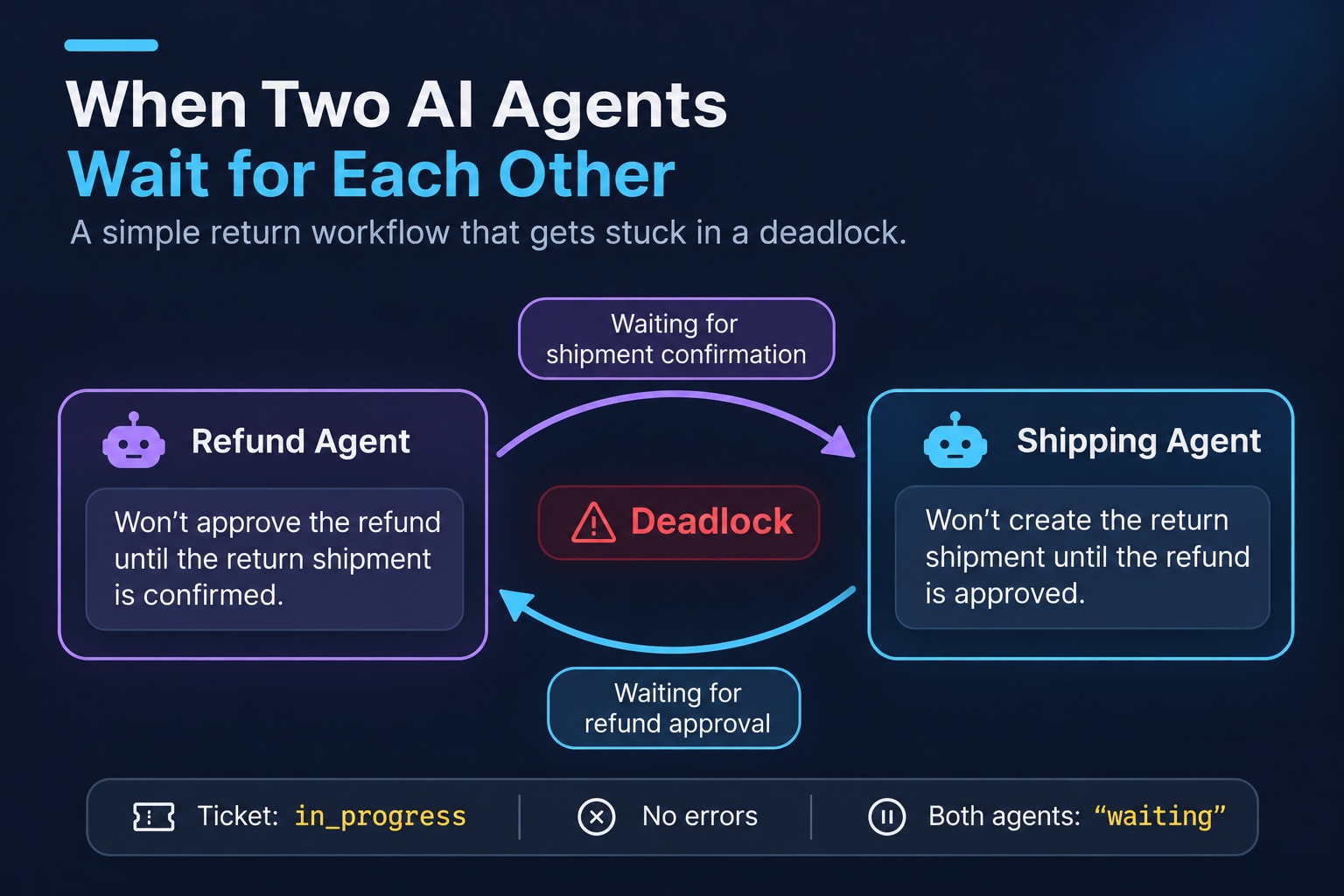
A customer returns a jacket. Two AI agents handle the return. The Refund Agent will not give the money back until the carrier confirms that the jacket is on its way back. The Shipping Agent will not create a return label until the refund is approved. Both rules make sense. But put them in one workflow, and nothing happens. No agent crashes. No log line says "error". The ticket stays in_progress forever, and both agents say "waiting".
Think of two friends after a fight. One says, "I will call after you call me." The other says the same thing. Both are waiting, and nobody calls. In software, this is a deadlock. Databases met this problem decades ago and learned to handle it. AI agent systems bring it back in a harder form, because the waits are hidden inside the agents' instructions.
This post makes the deadlock happen in a few lines of TypeScript. Then it shows how to find it with a simple search, and how to break it with a clear rule. You do not need to know databases or graph theory first. The post explains each idea when it first appears. The refund case is a made-up example, not a real incident. Every log in this post comes from running the code shown.
Words used in this post
| Word | What it means here |
|---|---|
| Agent | A program that uses an AI model to decide what to do next, guided by written instructions (its prompt). |
| Workflow | All the steps needed to finish one job, such as one refund. |
| Task | One step in the workflow, such as "issue the refund" or "create the return label". |
| Deadlock | Two or more tasks each wait for the other, so none of them can ever finish. |
| Cycle | A loop of waits: A waits for B, and B waits for A. Every deadlock has one. |
| Orchestrator | A normal program, not an AI, that tells the agents when to run and keeps track of who waits for whom. |
| Idempotency key | A unique ID sent with a request, so that a repeated request does not do the work twice. |
Two rules that are both correct
Look at each rule alone first.
The payments team does not want to refund a jacket that never comes back. So they wrote this in the Refund Agent's prompt: "Refund only after the carrier confirms the return." That is a sensible rule.
The logistics team pays for every prepaid return label. They do not want to pay for labels on returns that the company later rejects. So they wrote this in the Shipping Agent's prompt: "Create a return label only for an approved refund." That is also a sensible rule.
Now a customer asks for a refund on order R-1042. Here is what happens:
- The Refund Agent looks for a carrier confirmation. There is none, because nobody created a label. So it waits.
- The Shipping Agent looks for an approved refund. There is none, because the Refund Agent is waiting. So it waits too.
- Each agent now waits for something that only the other agent can do. Neither one ever moves.
Why did nobody see this coming? Two different teams wrote the two prompts, and nobody read them side by side. Each prompt is fine on its own. The problem exists only when both rules are in the same workflow. So you cannot find it by reviewing one prompt.
See it happen
The code below has no AI model in it. That is on purpose. The deadlock comes from the two rules, not from the model. In fact, a smarter model that follows its rules more carefully keeps the deadlock more reliably, not less.
// repro.ts: two agents, two rules, no progress. Run: node repro.ts
const board = new Map([["refund", "open"], ["return-label", "open"]]);
const sleep = (ms: number) => new Promise((resolve) => setTimeout(resolve, ms));

// Payments team rule: no refund before the carrier confirms the return.
async function refundAgent(): Promise<void> {
  for (let check = 1; check <= 3; check++) { // a real agent keeps checking, forever
    if (board.get("return-label") === "done") return void board.set("refund", "done");
    console.log(`refund-agent    check ${check}: waiting for return-label`);
    await sleep(1000);
  }
}

// Logistics team rule: no prepaid return label before the refund is approved.
async function shippingAgent(): Promise<void> {
  for (let check = 1; check <= 3; check++) {
    if (board.get("refund") === "done") return void board.set("return-label", "done");
    console.log(`shipping-agent  check ${check}: waiting for refund`);
    await sleep(1000);
  }
}

await Promise.all([refundAgent(), shippingAgent()]);
console.log("board after 3 checks:", Object.fromEntries(board));What the code does, in plain steps:
boardis a shared list of tasks. Both tasks start as"open", which means not done yet.refundAgent()checks the board. If the return label is done, it marks the refund done and stops. If not, it prints "waiting" and checks again one second later.shippingAgent()does the same thing, but it waits for the refund.Promise.allruns both agents at the same time, the way two real agents would run.
The output:
refund-agent    check 1: waiting for return-label
shipping-agent  check 1: waiting for refund
refund-agent    check 2: waiting for return-label
shipping-agent  check 2: waiting for refund
refund-agent    check 3: waiting for return-label
shipping-agent  check 3: waiting for refund
board after 3 checks: { refund: 'open', 'return-label': 'open' }Every line looks normal. Each agent does exactly what its prompt says. Nothing is marked as an error. The demo stops after three checks only because the loop has a limit of three. A real agent checks again and again, and every check costs money, because each check is an AI model call.
The four conditions
In 1971, three researchers, Coffman, Elphick and Shoshani, listed four conditions that cause a deadlock, in a paper called "System Deadlocks". A deadlock happens only when all four are true at the same time. The refund workflow has all four:
| Condition | What it means | In the refund workflow |
|---|---|---|
| Only one owner | Only one worker can do a given job. | Only the Refund Agent can refund. Only the Shipping Agent can create a label. |
| Hold and wait | A worker keeps its own job open while it waits for another job. | Each agent keeps its task open while it waits. |
| Nobody can force it | No one can take the job away or make the worker act. | Nothing can make an agent act against its rule. |
| Circular wait | The waits form a loop. | Refund waits for label. Label waits for refund. |
Here is the useful part: if you break any one of the four conditions, the deadlock cannot happen. The fix in Part 4 uses this idea.
What a database does
Databases have the same problem. A database runs many transactions at once. A transaction is a group of changes that must all succeed or all fail together. To keep data correct, a transaction locks the rows it changes. While a row is locked, other transactions must wait for it. Now suppose transaction 1 locks row A and waits for row B. At the same time, transaction 2 locks row B and waits for row A. That is a deadlock.
Databases do not try to stop every deadlock. Instead, they notice it and break it. The PostgreSQL manual says it "automatically detects deadlock situations and resolves them by aborting one of the transactions involved." It looks for a deadlock after a transaction waits for a lock for deadlock_timeout, which is one second by default. MySQL's InnoDB also detects deadlocks. It cancels one transaction, and it tries to pick a small one.
The cancelled transaction is then rolled back. A rollback undoes every change the transaction made, as if it never ran. So the application can simply try it again. AI agent systems have none of this built in.
The shape of the problem is the same. But three differences make the agent version harder:
- Nothing sees all the waits. A database keeps every lock in one place, so it can see the whole picture. Agents keep their waits inside their prompts, as plain sentences. No program can read them all.
- Nothing can be undone. When an agent sends a refund, an email or a label, it is done in the real world. There is no rollback. If you retry, you may do it twice.
- It does not happen every time. The AI model decides when to wait, and it may decide differently on each run. The same ticket can get stuck on one run and finish on the next. So ten passing tests do not prove that the workflow is safe.
Find the loop
To find a deadlock, first draw the waits as a picture. We call this picture a wait-for graph. Each task is a box. Each wait is an arrow from the task that waits to the task it waits for. If you can follow the arrows and come back to where you started, the arrows form a loop, called a cycle. A cycle means a deadlock.
How does a program find a cycle? It uses depth-first search. That name sounds hard, but the idea is simple. Put your finger on a box. Follow an arrow to the next box, and keep going as far as you can. Write down every box on your current path. If you reach a box that is already on your path, you went in a circle. That is the cycle. If a path ends with no more arrows, go back one step and try the next arrow.
In the picture: the search starts at refund. It follows the arrow to fraud-check, which has no arrows out, so that path ends there. It goes back and follows the arrow to return-label, then to refund-approval. From there, an arrow points back to refund, which is already on the path. That arrow closes the loop.
// cycle.ts: find a cycle in a wait-for graph with a depth-first search.
export type WaitGraph = Map<string, string[]>; // task -> the tasks it waits for

export function findCycle(graph: WaitGraph): string[] | null {
  const path: string[] = [];      // tasks on the current search path
  const done = new Set<string>(); // tasks already checked: no cycle through them

  function visit(task: string): string[] | null {
    if (path.includes(task)) return [...path.slice(path.indexOf(task)), task]; // back on the path: a cycle
    if (done.has(task)) return null;
    path.push(task);
    for (const next of graph.get(task) ?? []) {
      const cycle = visit(next);
      if (cycle) return cycle;
    }
    path.pop();
    done.add(task);
    return null;
  }

  for (const task of graph.keys()) {
    const cycle = visit(task);
    if (cycle) return cycle;
  }
  return null;
}What the code does, in plain steps:
WaitGraphstores the arrows. For each task, it lists the tasks it waits for.pathis the list of boxes under your finger right now.doneremembers the boxes already checked, so the search does not check them twice.visit()is the "follow the arrows" step. If the task is already onpath, it returns the loop. If not, it adds the task to the path, visits every task it waits for, and then removes it from the path again.- The last loop starts a search from every task, so that it checks every part of the graph.
You can use this check before any agent runs. Write each task's dependencies down as data, next to its prompt. Then run the check in CI (the automatic tests that run when someone changes the code), and reject any plan that has a cycle. In the example below, the cycle is hidden behind a definition: someone defined "refund approved" as "refund issued".
// check-plan.ts: check a workflow's declared dependencies in CI, before any agent runs.
import { findCycle, type WaitGraph } from "./cycle.ts";

const plan: WaitGraph = new Map([
  ["refund", ["fraud-check", "return-label"]],
  ["fraud-check", []],
  ["return-label", ["refund-approval"]],
  ["refund-approval", ["refund"]], // someone defined "approved" as "refund issued"
]);

const cycle = findCycle(plan);
console.log(cycle ? `plan rejected: ${cycle.join(" -> ")}` : "plan ok");plan rejected: refund -> return-label -> refund-approval -> refundThis check has a limit. It finds only the waits that people write down. An AI model can also decide to wait for something new while it runs. So the orchestrator in Part 4 runs the same check again, every time an agent asks to wait.
These are three common ways that the problem shows up, or that a quick fix makes it worse.
1. Handoff ping-pong
The patternMany agent frameworks let one agent hand off the job to another agent. The Refund Agent hands the ticket to the Shipping Agent, with the note "the return is not arranged yet". The Shipping Agent hands it back: "the refund is not approved yet". This repeats. Each handoff is one AI model call. Nothing waits, so nothing looks stuck.
The answerThe wait-for graph finds a loop of waits. It does not find a loop of handoffs, because a handoff is not a wait. You need a different safety net: a limit on the number of steps.
The fixSet a maximum number of steps for the whole workflow. Also, when an agent cannot act yet, make it say "wait" to the orchestrator instead of handing the job to another agent. A wait goes into the graph, where code can check it.
MaxTurnsExceeded error after max_turns steps, which is 10 by default.2. A wait the graph cannot see
The patternThe Shipping Agent asks the carrier for a label and waits for the carrier's webhook. A webhook is a message that the carrier's server sends to yours when something happens. But the carrier's system waits for your refund status API to say "approved" before it sends that message. The loop now goes through a system outside your workflow.
The answerNo. A graph finds only the loops it can see. The carrier's own waits happen inside the carrier's system, so they are not in your graph.
The fixGive every wait on an outside system, or on a person, a deadline. When the deadline passes, do not just try again. Send the ticket to a person, with the list of open waits, so a human can see the loop.
LOCK TABLES lock or a lock from another storage engine. For those cases, it relies on a timeout, innodb_lock_wait_timeout.3. The timeout that refunded twice
The patternA team adds a quick fix: if the workflow waits for 30 minutes, restart it. But the restart uses the same rules, so the same loop forms again. On another run, a worse thing happens. The refund request to the payment provider takes too long, so the code gives up. In fact, the provider already sent the money. The restart sends the refund again, and the customer gets paid twice.
The answerThe database rolled back the transaction before the retry, so the failed attempt left no changes behind. The workflow cannot roll back a refund. When a request times out, it means "I do not know what happened". It does not mean "nothing happened".
The fixTwo things. First, change something before you retry: break the loop with a rule, or send it to a person. Second, use an idempotency key. That is a unique ID for one action, like an order number on a receipt. Send the same key every time you retry the same action. The payment provider then sees that it already did this refund, and it returns the first result instead of paying again.
// the same key on every retry of this step, never a new one
const key = `${workflowId}:refund:${orderId}`;
await stripe.refunds.create({ payment_intent: paymentIntentId }, { idempotencyKey: key });The code builds the key from the workflow ID and the order ID, so the key is the same on every attempt. Never build it from the current time or a random number. Then each retry gets a new key, and the protection is gone.
One owner for every wait
The main change is this: agents should not wait for each other directly. Instead, each agent gives its answer to an orchestrator. The answer is either "done", or "I need to wait for X". The orchestrator is ordinary code, not an AI. It keeps all the waits in one graph, checks the graph for a loop, and decides what happens next. Think of it as a team lead who knows what every team member waits for.
This breaks two of the four deadlock conditions from Part 2:
- Hold and wait is gone. An agent does not sit and wait anymore. It reports "wait" and stops. The orchestrator runs it again later.
- "Nobody can force it" is gone. The orchestrator has a rule that says which task goes first, so it can force a decision.
The orchestrator in 50 lines
The agents below keep exactly the same two rules. What changes is who handles the waiting. The rule that breaks the loop is a business decision, not a technical one. Here it is: a label is easy to cancel, but a refund is hard to take back. So the label goes first.
// orchestrator.ts: agents return a decision. The orchestrator owns every wait.
import { findCycle, type WaitGraph } from "./cycle.ts";

type Decision = { kind: "done" } | { kind: "wait"; on: string };
type Agent = (ready: (task: string) => boolean) => Decision;

// The same two rules as before. An agent never waits. It returns "wait" and stops.
const agents: Record<string, Agent> = {
  "refund": (ready) => (ready("return-label") ? { kind: "done" } : { kind: "wait", on: "return-label" }),
  "return-label": (ready) => (ready("refund") ? { kind: "done" } : { kind: "wait", on: "refund" }),
};

// The business rule that breaks this cycle: a label is easy to void, a refund is not.
function policy(cycle: string[]): { first: string; skip: string } | null {
  if (cycle.includes("refund") && cycle.includes("return-label")) return { first: "return-label", skip: "refund" };
  return null; // no rule for this cycle: a person decides
}

const MAX_STEPS = 10;
const done = new Set<string>();
const skips = new Map<string, string>(); // task -> the dependency it may skip
const waits: WaitGraph = new Map();

for (let step = 1; ; step++) {
  const open = Object.keys(agents).filter((task) => !done.has(task));
  if (open.length === 0) { console.log(`step ${step}: workflow done`); break; }
  if (step > MAX_STEPS) { console.log(`stopped: more than ${MAX_STEPS} steps`); break; }

  for (const task of open) {
    const ready = (dep: string) => done.has(dep) || skips.get(task) === dep;
    const decision = agents[task](ready); // in production: an async model call
    if (decision.kind === "done") {
      done.add(task);
      waits.delete(task);
      console.log(`step ${step}: ${task} done`);
      continue;
    }
    waits.set(task, [decision.on]);
    console.log(`step ${step}: ${task} waits for ${decision.on}`);

    const cycle = findCycle(waits); // check every new wait
    if (!cycle) continue;
    console.log(`step ${step}: DEADLOCK ${cycle.join(" -> ")}`);
    const fix = policy(cycle);
    if (!fix) { console.log("no rule for this cycle: send it to a person"); process.exit(1); }
    skips.set(fix.first, fix.skip);
    waits.delete(fix.first);
    console.log(`step ${step}: rule: ${fix.first} goes first, it may skip ${fix.skip}`);
  }
}What the code does, in plain steps:
agentsholds the two agents. Each one gets a function,ready(), that answers "can I treat this task as done?". Each agent returns"done"or"wait". It never loops or sleeps by itself.policy()is the business rule. For the refund and label loop, it says: the label goes first and may skip its wait for the refund. For any other loop, it returnsnull, which means "no rule, ask a person".done,skipsandwaitsare the orchestrator's memory: which tasks are finished, which task may skip which wait, and the wait-for graph.- The main loop runs every open task once per step. When a task says "wait", the orchestrator adds an arrow to the graph and runs
findCycle()at once. If it finds a loop, it applies the rule. MAX_STEPSis the safety net from trap 1. If the work is not done after 10 steps, the orchestrator stops.
The output:
step 1: refund waits for return-label
step 1: return-label waits for refund
step 1: DEADLOCK refund -> return-label -> refund
step 1: rule: return-label goes first, it may skip refund
step 2: refund waits for return-label
step 2: return-label done
step 3: refund done
step 4: workflow doneRead the log from the top:
- Step 1. Both agents say "wait". The second wait closes the loop, and the check finds it at once. The rule lets the label go first.
- Step 2. The Shipping Agent may now skip its wait for the refund, so it creates the label. The Refund Agent still waits, because the label was not done yet when it checked.
- Step 3. The label is done, so the Refund Agent sends the refund.
- Step 4. Nothing is left to do. The workflow is finished.
What if no rule fits a loop? Then the code stops and sends the ticket to a person, with the loop in the message. That is the right result. A rule that guesses is worse than no rule.
Timeouts and limits
The loop check finds deadlocks. But other things can also make a workflow hang: a slow outside service, handoff ping-pong, or a model that repeats itself. Limits catch those. Use both.
- A step limit stops ping-pong. The code above uses
MAX_STEPS. - A timeout on every call stops a call to a slow service. In Node.js, pass an
AbortSignalto the call. AnAbortSignalis an object that tells a running request to stop. That way the request really stops, and does not keep running in the background. For example:fetch(url, { signal: AbortSignal.timeout(5000) })stops the request after 5 seconds. - A deadline for the whole workflow stops many slow steps that add up.
AbortSignal.any()combines it with the per-call timeout, so either one can stop the request.
Log the waits
When a ticket gets stuck in production, you need to see what each agent waited for. So log every wait as a pair: the task that waits, and the task it waits for. Add the workflow ID to every log line. Then you can draw the wait-for graph of any stuck ticket from the logs alone.
Many teams use OpenTelemetry, a standard way to record what each part of a system does. Its GenAI agent span conventions record one entry, called a span, for each agent call, named invoke_agent {gen_ai.agent.name}. These conventions are still marked "Development", so the names may change. Add each wait as an event on the agent's span.
Watch three numbers:
- The oldest open wait. A wait that is much older than normal often means a loop through an outside system (trap 2).
- Loops found, grouped by loop. If the same loop appears again and again, two rules conflict. Fix the rules.
- Steps per finished workflow. If this number goes up while traffic stays the same, look for ping-pong (trap 1).
Five myths, and what is true
| Myth | Reality |
|---|---|
| 1. "A timeout fixes deadlocks." | A timeout ends the wait, but not the cause. The retry makes the same loop again. |
| 2. "The model will notice that it is stuck." | Each agent sees only its own part of the work. From inside, "waiting for the carrier" looks correct. |
| 3. "We use no locks, so we cannot deadlock." | A deadlock needs owners and waits, not a lock. One sentence in a prompt is enough. |
4. "max_turns finds deadlocks." | It stops a run, but it does not say why. A loop check names the tasks in the loop. Use both. |
| 5. "A better model fixes it." | The loop is in the rules, not the model. A model that follows rules well keeps the loop more reliably. |
Test yourself
Try to answer each question first. Then open the answer.
1. Two agents both log "waiting" for ten minutes. Is it a deadlock, or a slow service?
Time alone cannot tell you. Look at what each one waits for. If each agent waits for a task that the other owns, it is a loop, and it never ends by itself. If a wait points at an outside service, the service may be slow, or the loop may go through that service.
2. Where should the arrows of the wait-for graph come from?
From data that the agent returns, such as { kind: "wait", on: "return-label" }. Never from reading the model's text answer. Code cannot check a wait that it cannot read.
3. The orchestrator finds a loop. Which task goes first?
The task whose result is easier to undo. The business decides this ahead of time and writes it as a rule. If no rule fits, send the ticket to a person.
4. A refund call timed out. Is it safe to try again?
Only with the same idempotency key. The refund may have happened, and only the reply got lost. With the same key, the payment provider returns the first refund instead of making a new one.
What it gives you, and what it costs
- A deadlock found in one step, with the loop named.
- Plans with a loop rejected in CI, before they reach users.
- A written rule for "who goes first".
- Retries that do not refund twice.
- An orchestrator that you must build, run and keep available.
- Agents that report "wait" instead of waiting by themselves.
- A business rule that someone must own.
- No help for loops through outside systems. Those still need deadlines.
The takeaway
- Write waits as data, not as sentences. Code cannot check a rule that lives only in a prompt.
- A timeout is a limit, not a detector. A loop check names the tasks. A rule decides who goes first.
- A retry is not a rollback. Send the same idempotency key on every attempt.
Try one exercise. Collect every "do not do X until Y" rule from your agents' prompts. Write each one as an arrow, and run findCycle on them. You may find a loop before your customers do.
Sources
- E. G. Coffman, M. Elphick and A. Shoshani: System Deadlocks, ACM Computing Surveys, 1971.
- PostgreSQL 18: Deadlocks and
deadlock_timeout. - MySQL 8.4: InnoDB Deadlock Detection.
- CrewAI: Collaboration ("Delegation Loops").
- OpenAI Agents SDK: Running agents and
run_config.py(DEFAULT_MAX_TURNS = 10). - Stripe: Idempotent requests.
- OpenTelemetry: GenAI agent spans.
- MDN:
AbortSignal.any().